


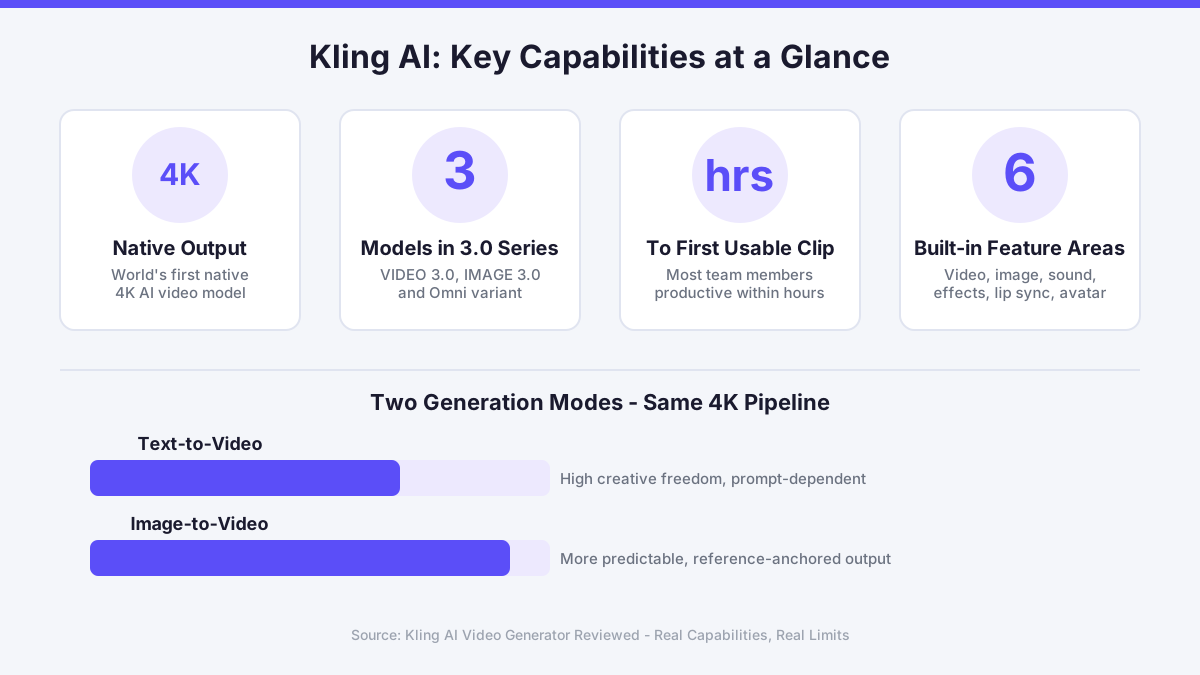
Most AI video tools ask you to pick a lane: text-to-video or image-to-video, but rarely both in the same workspace. Kling AI, built by Beijing-based technology company Kuaishou, takes a different approach. The platform launched with a suite that covers video generation, image generation, sound, effects, lip sync, and avatar creation under one roof. The Kling 3.0 model series, which includes VIDEO 3.0, IMAGE 3.0, and an Omni variant, was introduced as the world's first native 4K AI video model, a claim that matters when you are producing content for broadcast or large-format display rather than a social media thumbnail.
What the Kling 3.0 Model Actually Produces
Native 4K output is the headline feature, but the more interesting capability is multimodal instruction parsing. You can feed the model a text prompt, a reference image, or a combination of both, and it will attempt to hold narrative logic across a clip rather than treating each frame in isolation. That matters for anyone producing product demos, short films, or branded content where continuity between shots is non-negotiable.
The platform also includes a motion brush and camera control tools, which let you define how the virtual camera moves through a generated scene. This is where Kling AI starts to feel less like a novelty and more like a genuine production tool. You can specify a pan, a zoom, or an orbital move around a subject, and the model will attempt to honour that instruction. The results are not always perfect on the first generation, and prompt engineering still plays a significant role in output quality, but the controls are there and they are meaningful.
Avatar 2.0 and lip sync round out the feature set for anyone producing presenter-led content or localised video at scale. These tools are relevant for advertisers and e-learning producers who need a face on camera without booking a studio day. If you want to explore how camera instructions translate into actual motion, the Kling AI motion control guide covers that workflow in detail.
Text-to-Video and Image-to-Video: How the Two Modes Compare
Text-to-video is the entry point most users reach first. You write a prompt, choose a duration and aspect ratio, and the model renders a clip. The quality of the output depends heavily on prompt specificity. A vague prompt like "a city at night" will produce something generic. A structured prompt that describes lighting conditions, camera angle, motion speed, and subject behaviour produces output that is genuinely useful without heavy post-production.
Image-to-video is where many teams find their most reliable workflow. You supply a static image, describe the motion you want applied to it, and the model animates the scene. This is particularly effective for product photography, architectural renders, and illustration work, where you already have a controlled visual asset and simply need it to move. The result tends to be more predictable than pure text generation because the model has a reference frame to anchor its output.
Both modes benefit from the same underlying 4K pipeline, so you are not sacrificing resolution by choosing one path over the other. The practical difference is in how much creative control you want to exercise at the prompt stage versus the asset stage.
A Real Team Use Case From a GB Marketing Context
When I am evaluating any creative SaaS tool for a GB-based team, my starting question is always the same: what does this look like at 9am on a Monday when the team is under pressure and there is no time for a learning curve? Last spring I was working with a marketing director based in Bristol who needed to scale video content without adding headcount. Her team had the creative instinct but not the production capacity. She needed something her team could genuinely own, not a tool that would require a dedicated specialist to run.
After mapping her team's rhythm and workflow, I pointed her toward several AI-driven video platforms, and Kling AI was one of the stronger candidates for her use case. The alignment between her team's existing capacity and the platform's interface was a deciding factor. The all-in-one workspace meant they were not stitching together four separate tools. That kind of intentional simplification tends to create sustainable adoption rather than a short-lived experiment.
Her experience also highlighted something worth naming: the learning curve is real, but it is shallow. Most of her team were producing usable clips within a few hours of their first session. That is a meaningful data point for any stakeholder making a tool decision under resource constraints.
The API Platform and Developer Access
Beyond the creative studio, Kling AI offers an API platform aimed at developers who want to embed generation capabilities into their own products or pipelines. The API supports the same multimodal inputs as the studio interface and provides access to the Kling 3.0 models programmatically. This opens up use cases like automated video production at scale, dynamic content generation triggered by user actions, and batch rendering for large catalogues.
For developers evaluating the API, the quickstart documentation is the right place to begin. The platform uses standard RESTful conventions, which means integration into existing systems is straightforward for any team with backend engineering capacity. Rate limits apply and are tiered by plan, so it is worth reviewing the API pricing page before scoping a production integration. You can find the technical overview at the motion control documentation as a starting reference for understanding how parametric instructions translate into API calls.
If you are based in Belgium or working across European markets, the Kling AI Belgium site covers regional availability and localised guidance worth reviewing alongside the UK experience.
Where Kling AI Compares Well Against Rivals
Runway, Pika Labs, Stable Video Diffusion, and OpenAI Sora are the four platforms most often mentioned in the same conversation. Each has a different strength. Runway has a polished editing interface and strong adoption among video professionals. Pika Labs is accessible and quick for short social clips. Stable Video Diffusion appeals to developers who want open-weight models they can run locally. Sora, released by OpenAI, generates cinematically complex scenes but has limited public availability.
Kling AI's edge is the combination of native 4K output with a full multimodal workspace. You do not need to leave the platform to handle image generation, sound, or effects. For a team managing a content pipeline, that consolidation has real operational value. The 8% affiliate revenue share programme, with its 42-day cookie lifetime for web referrals, also indicates that Kuaishou is investing in community-led distribution, which tends to correlate with active product development and a growing user base.
What Could Be Better
Two concrete limitations are worth naming before any team commits to a paid plan. First, Kling AI's regulatory status in the EU and GB is listed as unknown in currently available documentation. For teams operating under strict data governance requirements or working with sensitive client content, that ambiguity is a real consideration. GDPR took effect in 2018 and requires clear data processing agreements, which any team handling personal data in generated content should verify directly with the platform before scaling usage.
Second, the freemium tier exists but is constrained enough that any meaningful production workflow will require a paid subscription. Teams evaluating the platform should factor subscription costs into their capacity planning from the start rather than assuming the free tier will sustain a real workload. The pricing page at klingai.com/dev/pricing is the authoritative reference for current plan costs, as figures change with model updates and promotional periods. Going in with clear expectations about where the free tier ends and paid usage begins will prevent friction later in the adoption process.
Comments
No comments yet.
Leave a comment
Your email will not be shown. Comments are reviewed before they appear.