


Native 4K output is the headline claim of Kling AI, a creative studio built by Kuaishou. For a UK business, resolution is the least interesting question on the table. Capacity, ownership and data handling decide whether a video tool earns its place or becomes another login nobody opens. This guide walks through the checks I would run before paying for any AI video generator, using Kling AI as the worked example.
Start with the outcome, not the tool
Before you compare vendors, write down what a finished video should achieve. Is it a product teaser for social, a training clip for staff, or a paid ad variation you will test in batches of twenty? Each of these needs a different tool profile. A training clip needs a stable presenter and lip sync. A paid ad test needs fast iteration and cheap retries.
Ask yourself how many videos you realistically publish each month. If the honest answer is three, a heavy enterprise platform is a poor fit. If it is sixty, per-clip pricing will punish you. Most teams I coach guess too high, then pay for capacity they never use.
Then look at your team's capacity right now. If people are already stretched, a new tool adds work before it removes any. Decide what you will stop doing when the tool arrives. Without that decision, the subscription is just another line on the card statement.
What Kling AI actually offers
Kling AI bundles video, image, sound and effects generation in one studio. Its Kling 3.0 series includes VIDEO 3.0, IMAGE 3.0 and Omni models, alongside Kling O1 and Avatar 2.0. The vendor describes the output as the first native 4K video model aimed at industrial-grade production. Camera control, a motion brush, lip sync and avatar creation round out the feature list.
For business use, three of those features matter more than the rest. Avatar creation helps with repeatable spokesperson content. Camera control lets a marketer direct a shot instead of hoping the model guesses. The API lets a developer wire generation into an existing workflow, which is where sustainable savings usually come from.
Our full Kling AI review goes deeper on output quality. For the developer route, see the Kling AI API guide. Here I will stay with the buying questions.
How AI video tools are usually priced
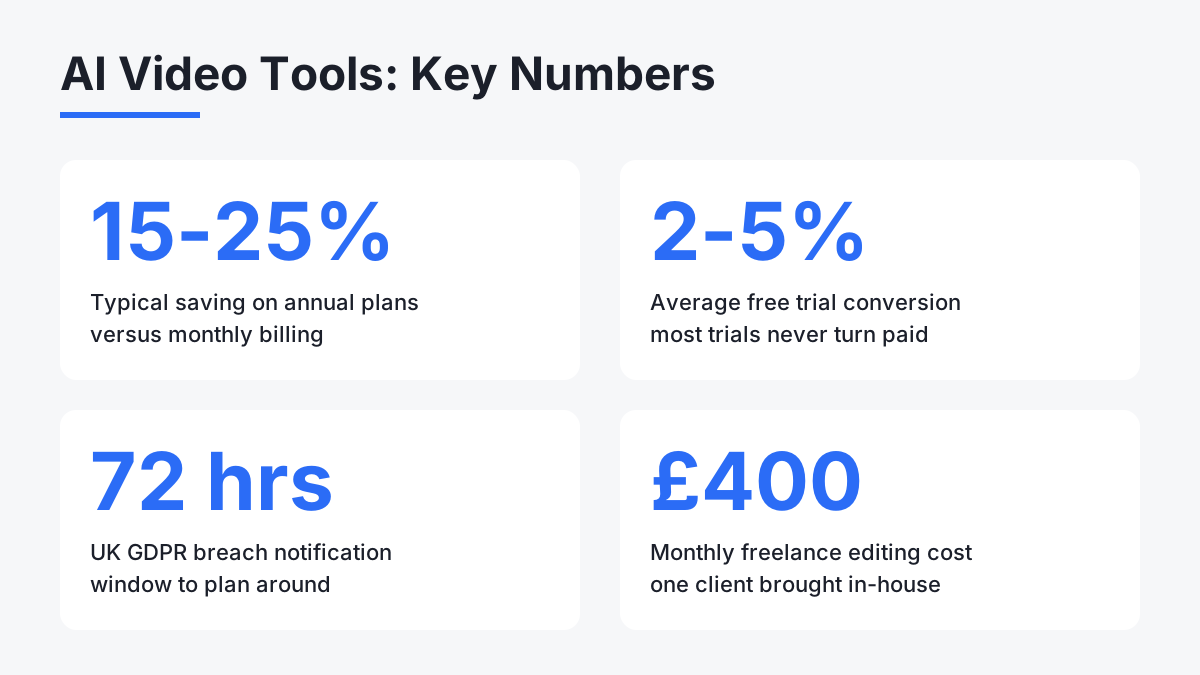
Most SaaS products land in one of four billing shapes: a flat subscription, per-seat pricing, usage-based charges, or tiers that unlock features. Video generation often blends a monthly plan with credits, because rendering costs real compute. Annual plans commonly save 15 to 25 percent against monthly billing, which sounds attractive until you remember you are committing before you know your real usage.
I could not confirm current Kling AI plan prices from the data on file, so check the live pricing page rather than trusting any third-party figure, including ours. What you can do in advance is build a simple model. Multiply clips per month by average retries per clip. AI video rarely lands on the first attempt, and a tool that charges per generation costs more than its sticker suggests.
Free trials deserve the same discipline. Industry averages put trial conversion at 2 to 5 percent, so most people who start one never pay. Use a trial properly: run a real project from brief to export, time it, and count the retries. A demo prompt tells you nothing about your own brand assets.
The ownership question most reviews skip
A client of mine in Edinburgh switched to a new video generation tool last October. Within about three weeks I watched her content output change. She had been paying roughly 400 pounds a month for freelance editing. That cost dropped meaningfully, and her team took over the creative process themselves.
What struck me was not the saving. It was ownership. Her team now decided what got made and when, instead of waiting on a queue. I have been testing Kling AI in a similar setup for my own content work, and the question I keep asking is the one I give every client: does this create sustainable capacity, or only temporary convenience?
Convenience fades when the novelty does. Capacity lasts when the tool sits inside a repeatable rhythm: a weekly slot for briefs, a named person who reviews output, a shared folder of approved brand assets. Skip that structure and even the best generator produces a pile of clips nobody trusts enough to publish.
UK data questions to put to any vendor
If you upload customer faces, staff footage or anything containing personal data, UK GDPR applies. It sits alongside the EU regime that took effect in 2018, and the obligations are similar: a lawful basis for processing, a data processing agreement, breach notification within 72 hours, and respect for data subject rights. Cross-border transfers need a recognised safeguard.
Kling AI is made by a Beijing-based company, and the regulatory status for the UK is listed as unknown in our records. That is not an accusation. It is a gap you should close before you upload anything sensitive. Our page on Kling AI and UK GDPR covers what we know, and the separate piece on whether Kling AI is safe looks at the wider risk picture.
Put these questions to the vendor in writing. Where is uploaded content stored and processed? Is it used to train models? Can you delete it, and how fast? Is a data processing agreement available? Which security certifications does the vendor hold? A vendor that answers plainly earns trust. One that deflects tells you what you need to know.
What could be better
Be honest about the weak points before you buy. First, the pricing detail was not verifiable from the data on file, so you cannot forecast cost without visiting the vendor directly. That is a real obstacle for a finance lead who needs a number before approving spend.
Second, no UK-specific data position is documented. A business handling client footage cannot treat that as a minor point. Third, our records list no payment methods, so confirm that invoicing, VAT receipts and company card billing work for you. Finally, native 4K is impressive, but most business channels display at 1080p or lower, so you may pay for resolution you never use.
Where the API changes the maths
Kling AI provides an API platform for developers, and that is where business value can compound. Manual generation scales with human hours. An API scales with code. If you run an ecommerce catalogue of 500 products, generating a short clip per product by hand is a slog. Wiring the API into your product feed turns it into a scheduled job.
The catch is rate limits, versioning and support. Check how the vendor handles deprecations, because a model update that changes output style can break a pipeline overnight. Ask for sandbox access first. Our API guide lists what to test before you commit engineering time.
A short decision checklist
Run your shortlist through five checks. Does the output match the quality your channels need? Can you forecast monthly cost from your own usage? Do the vendor's data answers satisfy your legal contact? Can your team own the process without a specialist? Is there an exit route, meaning can you export your work and cancel without friction?
Compare at least two alternatives. Runway, Pika Labs, Stable Video Diffusion and OpenAI Sora all sit in the same space. Kling AI's distinguishing claims are native 4K and multimodal instruction parsing. Whether those matter depends on your use case, not on the marketing.
Also check legitimacy signals before paying. Our note on whether Kling AI is legit pulls those together. If you are comparing regional offers, the Belgian site Kling AI Belgium covers the same product for another market.
Common questions UK teams raise
Most hesitation comes from three places: cost surprise, data exposure and skills. Cost surprise is solved by modelling retries up front. Data exposure is solved by written vendor answers and by keeping personal data out of early tests. Skills are solved by assigning one owner and running a small pilot, rather than rolling out to the whole department at once.
Start narrow. Pick one video type, one channel and one reviewer. Run it for a month, count hours saved against hours spent fixing output, and only then widen the scope. That rhythm keeps the experiment honest and gives your stakeholders a real result to judge instead of an enthusiastic demo.
Comments
No comments yet.
Leave a comment
Your email will not be shown. Comments are reviewed before they appear.