

The free tier is permanent, not a countdown
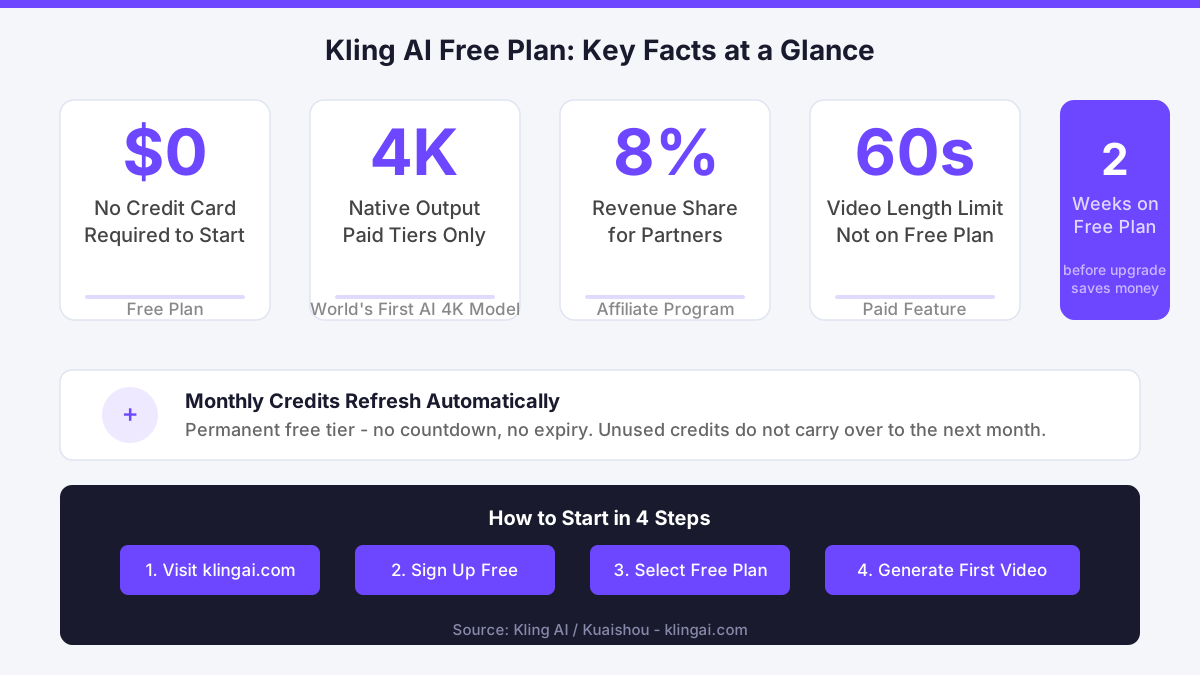
Kuaishou launched Kling AI out of Beijing, and since day one the platform has run on a freemium model rather than a ticking clock. A lot of people search for a Kling AI free trial expecting a 7-day window that disappears. That is not how it works. The free subscription tier is permanent: monthly credits refresh each billing period, and there is no credit card required to start. You register, pick the free plan, and the credits land in your account straight away.
The practical implication is that you are not racing a clock. You can take a week to generate three videos, study the results, and come back the following month without losing access. That patient, intentional approach to trialling a tool is exactly what separates creators who actually learn it from those who exhaust a time-limited window and walk away having barely scratched the surface.
What the free plan actually includes
On the free tier you receive a monthly allocation of credits. Those credits cover text-to-video generation, image-to-video conversion, and still image creation - the three core workflows most creators need to evaluate first. Generation runs at standard quality and standard resolution. Native 4K output, which Kling AI introduced as the world's first natively 4K AI video model, is reserved for paid tiers.

Free plan videos are also capped on length. Short clips work fine for testing motion quality and prompt fidelity, but if you need a 60-second scene for a commercial project, you will hit the ceiling quickly. The affiliate program dossier confirms the platform offers an 8% revenue share for partners, which signals Kling AI is deliberately structured to convert free users into paying customers - so expect the free tier to be generous enough to demonstrate value, but lean enough to make upgrading feel worthwhile.
Camera control tools, the motion brush, lip sync, and Avatar 2.0 features are visible in the studio interface even on the free plan. Whether you can render with them depends on your credit balance and plan limits at that moment. This is useful: you can explore the interface and understand what each tool does before committing to a paid tier.
How to sign up and generate your first video
Go to klingai.com and click the sign-up button in the top right corner. You can register with an email address or link a Google account. Once verified, the platform lands you inside the creative studio. Select the free plan when prompted - do not skip past this step assuming you are already on it. Confirm your plan status in the account settings tab.
From the studio, choose Video Generation and type a text prompt. Keep your first prompt short and specific: a subject, an action, a setting. Something like "a red kite soaring above the Brecon Beacons at golden hour" will test both motion quality and environmental detail. Submit, and the queue processes your request. On the free tier, generation typically takes longer than on paid plans because priority processing is a paid feature. Set expectations accordingly: your first clip might take several minutes.
Once it renders, download it, play it back at full resolution, and assess the motion consistency and prompt adherence. That single test clip will tell you more about whether Kling AI fits your workflow than any marketing page can.
Starting intentionally beats starting at maximum
In April I worked with a SaaS startup founder in Nottingham to set up her first AI video workflow, and within the first hour the temptation was immediate: jump straight to the highest tier and unlock everything at once. We stepped back and mapped what she actually needed in the first 60 days versus what could wait. She stayed on the free plan for the first two weeks, generated a handful of clips, identified which specific features were blocking her real work, and only then upgraded to the tier that addressed those specific gaps. That approach saved her real money and removed the frustration of paying for capacity she had not yet learned to use. The same logic applies to you here: own the free tier first, identify your actual ceiling, then decide.
Where the free tier falls short
Be direct about this: the free monthly credits run out faster than most creators expect. A single 5-second 4K clip on a paid tier costs more credits than a short standard-definition clip on the free plan, and once your monthly allocation is gone, generation stops until the next refresh. There is no carryover - unused credits from one month do not roll into the next.
The lack of priority queuing on the free tier is a genuine friction point for anyone working to a deadline. If you are producing content for a client with a same-day turnaround, waiting in a longer queue is a real operational problem, not a minor inconvenience. That is a concrete reason to upgrade, not a vague one.
Data handling is worth noting too. Kling AI is developed by Kuaishou, a Chinese technology company. UK and EU creators working with sensitive brand assets should review the platform's privacy policy before uploading proprietary footage or client materials. GDPR took effect in 2018 and continues to shape how platforms processing personal data of UK residents must behave post-Brexit. Before you move beyond test prompts, pull up Kling AI's data processing terms, check them against your client contracts, and ask yourself: would I be comfortable if this footage appeared in a training dataset?
Comments
No comments yet.
Leave a comment
Your email will not be shown. Comments are reviewed before they appear.